Setting Items on Operation Panel
 Note
Note
-
Administrator privileges are required for displaying/changing some setting items if Administrator information is set.
-
Values set at the operation panel are applied to all print jobs as printer default values. However, if the same setting items are in the printer driver, the printer driver settings take priority.
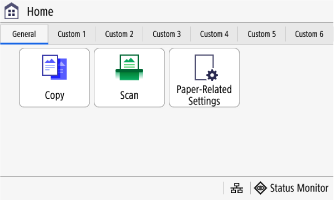
Status Monitor
Check printer information, usage status/logs, network settings, error information, etc.
 Copy
Copy
Use copy operations and make copy settings.
 Scan
Scan
Use scan operations and make scan settings.
 Paper-Related Settings
Make paper settings.
 Menu
Menu
-
Preferences
-
English Keyboard Layout
Set the layout for a USB keyboard connected to the printer.
-
Adjustment/Maintenance
-
Adjust Scanner Image Quality
-
Function Settings
-
Set Destination
Set PIN entry to be required to register/edit the address book.
-
Management Settings
-
Initialize All Data/Settings
 Address Book
Register destinations for sending/saving scan data. You can also specify destinations from the address book and recall the send function.

 Home Screen Settings
You can add shortcut buttons in the Home screen, or change button layout.

 Online Manual
Display a QR code for displaying the Online Manual.
 Wi-Fi Settings
Connect the printer and a PC via a wireless LAN router (access point).
 Monitoring Service
Check that communication is possible between the printer and the monitoring server.
