Address Book Function
You can register destinations for sending/saving scan data to the printer's address book.
- Registering Destinations to the Address Book using Operation Panel
- Registering Destinations to the Address Book using Remote UI
Destinations that can be registered
Email address
Destinations for saving files (shared folders)
What the address book enables you to do
You can recall and specify registered destinations from the Home screen or scan screen in the operation panel.
-
Select any function used for quickly specifying destinations, and then register the destination.
-
Favorites
Any type of destination can be registered, and a registered destination can be displayed alone in the address book screen, so destination searching is easy.
-
Coded Dial
Register 3-digit codes for destinations. Enter a code to specify a destination directly.
-
-
You can also specify destinations efficiently by grouping destinations or displaying destinations by type.
-
Registering as a group
You can register several already registered email addresses together to Favorites or Coded Dial. This saves effort specifying several destinations when sending.
-
Group indexing
Destinations can be displayed categorized by the first letter of the registered name or by type of destination.
-
 Note
Note
- Register up to 19 Favorites destinations, up to 281 Coded Dial codes, and up to 299 groups.
- You can only register destinations of the same type in any one group.
Address book screen
Recalling the address book from the Home screen or scan screen displays the following screen.
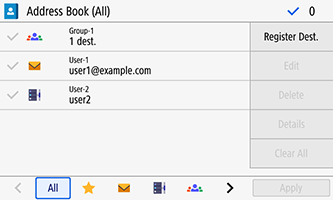
List of registered destinations
-
Type of destination is indicated with a mark, and destination information such as name and email address appear.
 : Email
 : Destination for saving files (shared folders)
 : Group
For destinations registered to Favorites, a
 is displayed next to the mark.
Index
-
Appears at the bottom of the screen. Selecting the type of destination or first letter of a name allows you to filter and display destinations in a list.
- Tap
 /
/  or flick left/right to switch index displays.
 - To display all destinations registered in the address book, select All.
- When specifying the destinations to be displayed by initials of the name, select A-Z, 0-9, or ABC to YZ.
- Tap
Operations for managing destinations
-
Displayed at the right of the screen. You can register, edit, and delete destinations, or specify destinations as send/save destinations.
- For items other than Register Dest., first checkmark destinations to work with them.
- If the address book is recalled in the Home screen, checkmarking destinations and pressing Apply causes the destinations to be already entered when the scan screen is displayed.
