Operation Panel
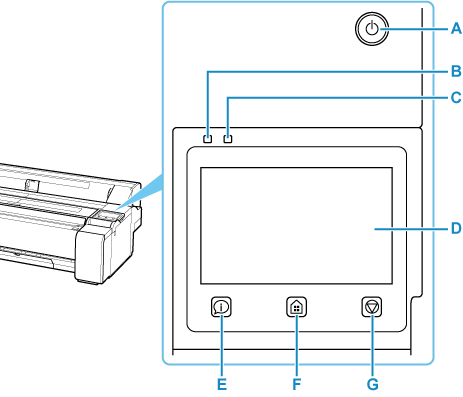
- A: ON button/ON lamp
-
Turns the printer on and off.
The ON lamp is lit when the printer is on or in Sleep mode.
- B: Data Lamp
-
Flashes while the printer is operating, such as during communication or printing.
Stays lit when there is data waiting to be processed.
- C: Error Lamp
-
Flashes or stays lit when an error occurs, such as a paper jam.
- D: Touch Screen
-
Shows printer menus, as well as the printer status and messages. You can select menu items and display buttons by gently touching the screen with your fingertip.
- E: Overview button
-
Displays the Overview screen.
- F: HOME button
-
Displays the Home screen.
- G: Stop button
-
Cancels the operation in progress.
 Note
Note
- When the printer is in Sleep mode, to restore the display, touch the touch screen.
-
When Operation panel lock is enabled, touch screen operations are invalid.
