Front
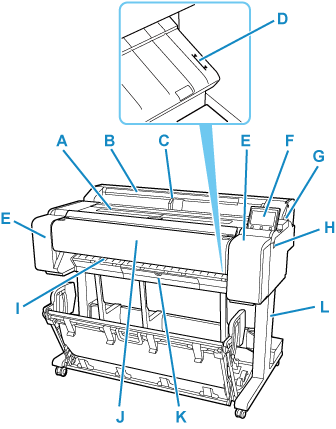
- A: Top Cover
-
Open this cover to install the print head and remove any jammed paper from inside the printer, as needed.
- B: Roll Paper Cover
-
Open this cover to load rolls.
- C: Width Guide
- When loading the sheets , move the guide to match the paper size.
- D: Paper Alignment Line
- A white line for alignment of paper.
- E: Ink Tank Cover
-
Open this cover to replace the ink tank.
- F: Operation Panel
-
Use this screen to operate the printer and check the printer status. The angle of the screen can be adjusted freely.
- G: Release Lever
- When releasing the Paper Retainer, push this lever back.
- H: USB flash drive port
- Insert a USB flash drive to this port.
- I: Output Guide
- Supports output paper.
- J: Scanning Unit
-
An original is scanned here when copying or scanning.
- K: Maintenance Cartridge Cover
-
Open this cover to replace the maintenance cartridge.
- L: Printer Stand
-
A stand that holds the printer. Equipped with casters to facilitate moving it.
