 Borders Appear in the Minimal Margin Printing/Borderless Printing
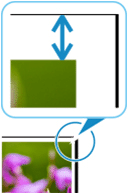

This product is capable of the minimal margin printing. Some software displays this as borderless printing.
In the minimal margin printing, small margins will appear on the left and right sides of the paper. If you are not getting the expected results with minimal margin printing, check the following.
-
Check 1 Is the position of the Print head adjusted?
Adjusting the position of the Print head will improve the printing accuracy.
To print with the specified amount of minimal margin, the print head height must be lowered.
-
Paper thickness (head height): Auto or Standard
-
Prevent paper abrasion: OFF
-
-
Check 2 Did you perform Roll paper minimal margin amount?
Adjust the left and right margins in Roll paper minimal margin amount in the touch screen menu.
-
Check 3 When printing at full-scale with minimal margins or borderless, is the selected paper wider than the original size?
For the printing at full-scale with minimal margins or borderless, use roll paper that has the same width as the original size.
-
Check 4 Does the source file have margins?
Check that the printing image data does not have any objects like crop marks and transparent objects.
-
Check 5 Is a margin set in application software?
Check that no margins are configured in the application software you are using.
