Front
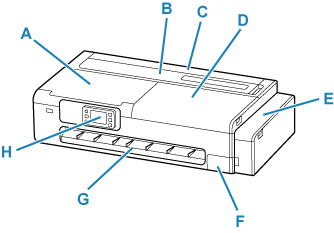
- A: Scanning Unit / Cover
-
Open when performing printer maintenance or when removing jammed paper.
- B: Cut Sheet Feed Cover
-
Open when loading sheets, postcards, envelopes or medicine envelopes in the top feed.
- C: Roll Paper Feed Cover
-
Open when loading rolls. Operate with the cut sheet feed cover open.
- D: Access Cover
-
Open when performing printer maintenance or when removing jammed paper.
- E: Ink Tank Cover
-
Open to refill ink tanks.
- F: Maintenance Cover
-
Open when replacing the maintenance cartridge.
- G: Output Guide
- Supports output paper.
- H: Operation Panel
-
Use to change the settings of the printer or to operate it.
The tilt of the operation panel can be adjusted in three steps.
Scanning Unit
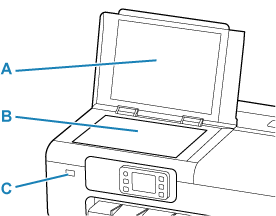
- A: Document Cover
- Open to load an original on the document platen.
- B: Document Platen
-
Load an original here.
- C: USB Flash Drive Port
-
Insert USB flash drives here.
Inside of Ink Tank Cover, Inside of Maintenance Cover
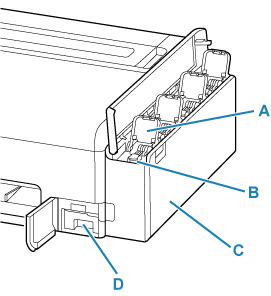
- A: Ink Tank Inner Cover
- Open to refill ink tanks.
- B: Tank Caps
- Open to refill ink tanks.
- C: Ink Tanks
-
Containers for ink inside the printer. Refill when the ink runs low.
- D: Maintenance Cartridge
Maintenance Cartridge
Model number: MC-32
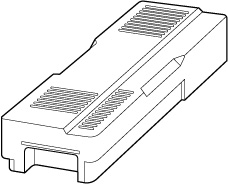
Absorbs ink used for cleaning.
 Important
-
When purchasing, check the Model number.
