Checking the Ink Tank Model Number
You can check an ink tank model number from the printer itself or from a PC.
Checking from the printer
-
In the Overview screen, select the ink display area.
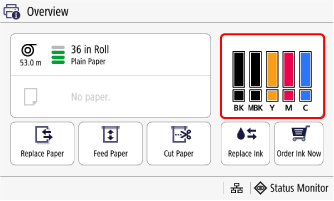
-
Select Check Item Name.
Checking Using Web Browser
-
Start up Remote UI.
-
Select Check Consumables Details....
Checking Using Canon IJ Status Monitor ( Windows )
-
Start up Canon IJ Status Monitor.
-
Select Estimated ink levels.
-
Select Ink Model Number information.
The screen may vary depending on the printer you are using.
 Note
Note
- For instructions on replacing the ink tanks, see Replacing Ink Tanks.
