Roll paper cannot be inserted into the Paper Feed Slot

-
Check 1 Is the roll paper curled?
Straighten out curls and reload the roll.
-
Check 2 Is paper jammed in the feed slot?
Remove the jammed paper.
-
Check 3 In the Overview screen on the touch screen, check the paper information.
If "Roll" is not displayed, select Replace Paper or Load Paper, and then load the roll paper.
 Important
- You cannot load a roll paper and sheets on the printer at the same time.
-
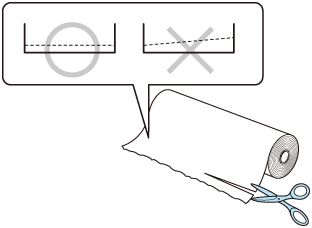
Check 4 The leading edge of the roll paper may not be cut properly.
If the leading edge of the roll paper is crooked or folded, the paper may not be fed correctly. Cut the leading edge with scissors to straighten it. If the roll paper has a printed barcode, be careful not to cut the barcode part.