Cleaning Inside the Scanning Unit
If there is dirt inside the scanning unit, images may not be scanned cleanly or dirt may get on originals or printed paper. If there is dirt, wipe it away.
 Important
-
When cleaning, do not use tissue paper, paper towel, or coarse cloths, as they may scratch the surface.
-
Do not subject the scanner glasses or white calibration strips to strong force.
-
Do not use neutral detergent or volatile chemicals such as benzine, thinner, or alcohol. May cause a malfunction.
-
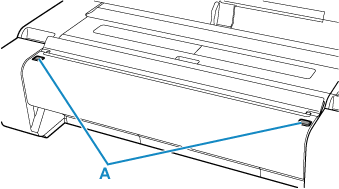
Press the left and right scanning unit release buttons (A) to open the scanning unit.
-
Remove any paper dust or dirt inside the scanning unit.
-
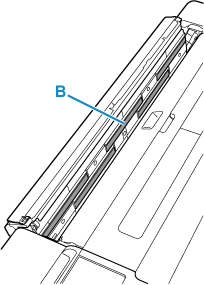
Wipe the scanner glasses (B) with a dry, soft cloth.
 Note
Note-
If dirt is stubborn, wipe it away with a cloth dampened with water and wrung out well, then wipe with a dry, soft cloth.
-
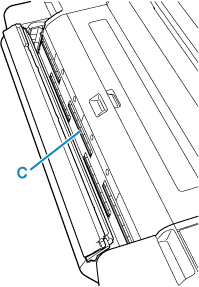
If the white calibration strips (C) are dirty, wipe them with a dry, soft cloth. Do not wet-wipe them.
-
-
Close the scanning unit.
Make sure the left and right scanning unit release buttons are securely locked in place.
-
Restart the printer.
