Loading Originals in the Scanning Unit
Use the following steps to load an original.
 Important
-
Before using the scanner, check the condition of the original.
To prevent paper jams and malfunctions, do not load wet originals, dusty originals, or originals that exceed the supported feed size.
-
When scanning originals you do not want to damage, very thin originals, or originals with wrinkles, use a commercially available carrier sheet.
-
Scan curled originals after flattening them as much as possible.
-
Load originals 1 sheet at a time.
-
Do not allow foreign objects to enter the original feed slot.
-
When copying or scanning, do not expose the original feed slot to strong light.
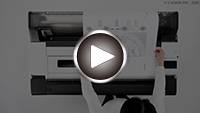
-
Check that the roll paper cover is closed.
-
Raise the original feed slot cover.
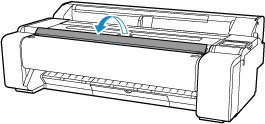
 Note
Note-
If scanning thick, rigid paper, and the original comes in contact with the original feed slot cover, open the original feed slot cover fully.
-
-
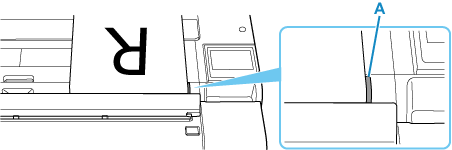
With the side to be scanned facing up, align the right edge of the original with the guide (A) at the original feed slot.
 Note
Note-
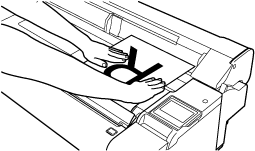
It is recommended to place the original on the top of the printer when positioning it.
-
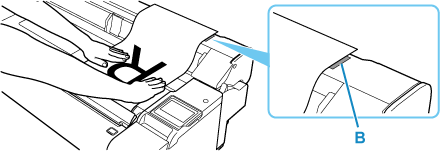
If the original is long, use the guide (B) on the roll paper cover as a reference to keep the original from skewing.
-
-
Push the original so the leading edge goes all the way to the end of the original feed slot.
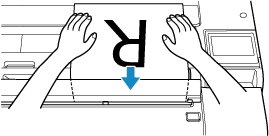
Once the leading edge of the original reaches the back of the original feed slot, the original is pulled in slightly.
The printer emits a sound and the original is automatically fed to the scan start position.
Important-
During automatic feeding and scanning, do not prevent the original from being pulled in.
-
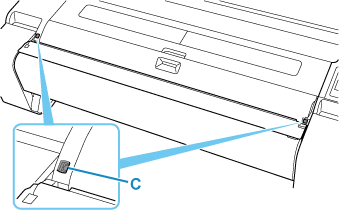
During automatic feeding and scanning, do not lower the original feed slot cover or touch the sensors (C) near the original feed slot. Scanning will stop.
Note-
To reload the original, select
 (remove original button) on the touch screen and remove the original.
-
