Changeable Setting Items Using Remote UI
 Note
Note
-
The item which can be used is different in administrator mode or in standard user mode.
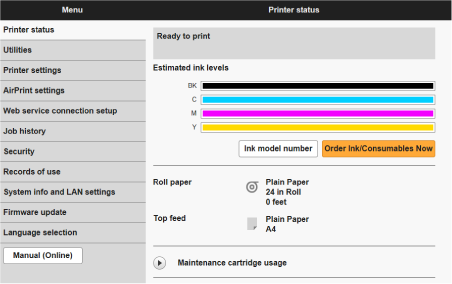
- Printer status
-
This function displays printer information such as the remaining ink amount, the status, and detailed error information.
You can also connect to the ink purchase site or support page, and use Web Services.
- Utilities
- This function allows you to set and perform maintenance such as cleaning.
- Printer settings
-
You can change various settings, such as print settings.
You can disable any operations using the operation panel from Operation panel lock on Custom settings.
Note-
Some of the menu is available only when you logged on in administrator mode.
-
- AirPrint settings
- This function allows you to specify the AirPrint settings when printing with AirPrint.
- Web service connection setup
- This function configures web services that use printer device information.
- Job history
- This function allows you to display the job history and set the public setting.
- Security
- Set passwords, make settings related to certificates for encrypted communication, and other security settings.
- Records of use
- Get information on printer usage.
- System info and LAN settings
-
- Confirm system information
- LAN settings
- Firmware update
-
You can update the firmware of the printer, check the firmware version, or perform settings of a DNS server and a proxy server.
- Language selection
- This function allows you to change the language on the display.
- Manual (Online)
- This function displays the Online Manual.
