Page Processing
Configure detailed settings for when printing to roll paper.
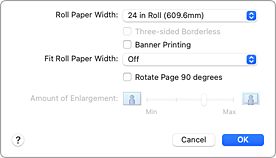
- Roll Paper Width
-
Select the roll paper width.
Select the width that matches the width of the roll paper loaded in the printer. - Three-sided Borderless
- If you check this check box, and the width or the length of the output paper size is smaller than the roll width, a margin will be created on the right of the document, and the left side will have minimal margins when printing.
- Banner Printing
- Select this check box to print documents with several pages as one continuous document. When you do this, the spaces between the pages will be removed.
- Fit Roll Paper Width
-
The printer automatically expands or reduces the document to match the roll paper width and then prints the document.
If you feel the left and right margins are different sizes, adjust the margin amount from Roll paper minimal margin amount on the printer. Then, perform printing.
For instructions on how to adjust Roll paper minimal margin amount, refer to "Setting the Minimal Margin Amount When Performing the Minimal Margin Printing."- Off
- The document is printed as-is without being expanded or reduced.
- On (Bordered)
- When minimal margin printing is performed, the printer automatically enlarges or reduces the document to match the roll paper width and then prints the document.
- On (Borderless)
- When borderless printing is performed, the printer automatically enlarges or reduces the document to match the roll paper width and then prints the document.
- Rotate Page 90 degrees
- When you print a portrait document onto roll paper, you can save paper by rotating the document 90 degrees and print the document horizontally relative to the paper.
- Amount of Enlargement
-
Adjusts how much of the document is enlarged when printing with minimal margins by using the Amount of Enlargement slider bar.
Drag to slider bar to the right to increase the enlargement amount, and to the left to decrease the enlargement amount.
 Note
Note
- Depending on the settings, some items cannot be set.
