Information Required for Wireless Connection to Wireless Router
The information required for a wireless connection to a wireless router is displayed on the back or bottom of the wireless router.
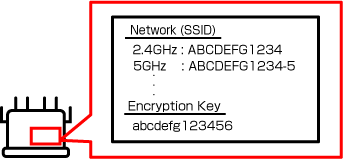
-
Network name (SSID)
Normally, this is indicated as network name (SSID) on the wireless router.
The following expressions may also be used depending on the manufacturer.
- Wireless network name
- Wi-Fi name
- SSID
Check this so as not to mistake the connection destination. When directly entering the SSID in manual connection, a connection will not be possible if a mistake is made, including with respect to uppercase and lowercase letters.
-
Encryption key
Normally, this is indicated as encryption key on the wireless router.
The following expressions may also be used depending on the manufacturer.
- Network password
- Network key
- Network security key
- Wi-Fi password
- Wireless security key
- PSK-AES key or SAE-AES key
This is required when connecting manually. A connection will not be possible if a mistake is made, including with respect to uppercase and lowercase letters.
Refer to the following page and check the SSID and encryption key for the wireless router with the computer/smartphone/tablet connected. Correctly write down the SSID and encryption key for the connection destination of the printer without making any mistake.
 Note
Note-
To prevent leaks, the encryption key may not be displayed on the wireless router unit. Refer to the manual of the wireless router.
