
You can delete a specified document in the machine's memory or delete all the documents in its memory at a time.
 Deleting a Specified Document in Machine's Memory
Deleting All the Documents in Machine's Memory
 Note
NoteWhen deleting a specified document, you specify it by its transaction number. If you do not know the transaction number for your target document, print the list of documents (MEMORY LIST) first.
Specify the document and delete it following the procedure below.
Make sure that the machine is turned on.
Press the FAX button.
The Fax standby screen is displayed.
Press the Menu button.
The FAX menu screen is displayed.
Use the 
 button to select Memory reference, then press the OK button.
NoteIf no document is stored in the machine's memory, No documents in memory is displayed on the LCD.
Use the button to select Del. specified doc., then press the OK button.
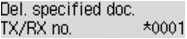
The document selection screen is displayed.
 Note
NoteA transaction number from "0001" to "4999" indicates a document being sent. A transaction number from "5001" to "9999" indicates a document being received.
Each mark before the transaction number indicates the following:
No mark: Indicates a black and white document.
 : Indicates a color document.
 : Indicates the document during transmission.
 : Indicates the document sent with sequential broadcasting.
By pressing the  button or the Tone button, the transaction number displayed on the LCD is switched to transaction time or fax/telephone number.
Use the button to select the transaction number (TX/RX no.) of the document you want to delete, then press the OK button.
The confirmation screen is displayed.
Use the button to select Yes, then press the OK button.
The specified document will be deleted from machine's memory.
NoteIf there is not the specified document in the machine's memory, No document is displayed, and the machine returns to the previous screen.
To return to the Fax standby screen, press the Stop button.
Delete all the documents in the machine's memory following the procedure below.
Make sure that the machine is turned on.
Press the FAX button.
The Fax standby screen is displayed.
Press the Menu button.
The FAX menu screen is displayed.
Use the button to select Memory reference, then press the OK button.
NoteIf no document is stored in the machine's memory, No documents in memory is displayed on the LCD.
Use the button to select Delete all docs, then press the OK button.
The confirmation screen is displayed.
Use the button to select Yes, then press the OK button.
All the documents in the machine's memory will be deleted.
Page top |


