Merge Lines
Specifies how colors should be processed when lines overlap.
This item is displayed when Menu then Function Settings > Printer > Printer Settings > HP-GL/2 Settings > Line & Pen Manager is selected in the Home screen.
 Note
Note
- The data is given priority when a specification command is included in the HP-GL/2 data.
- If the HP-GL/2 data does not include a specification command, the operation is performed using the specified selection value.
-
OFF
The section where lines overlap becomes the same color as one of the intersecting lines.
-
ON
The section where lines overlap becomes the mixed color of the intersecting lines.
ENABLE MERGE EXAMPLE
-
When OFF is selected:
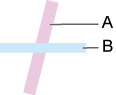
- Data drawn previously
- Data drawn later than A
-
When ON is selected:

