Oversize
Specifies whether margins are within or outside the HP-GL/2 data image drawing range.
This item is displayed when Menu then Function Settings > Printer > Printer Settings > HP-GL/2 Settings > Paper Settings is selected in the Home screen.
-
OFF
Specifies margins inside the HP-GL/2 data image drawing range.
Depending on the layout, adding margins inside the image drawing range may cause part of the image to be cut off.
-
ON
Specifies margins outside the HP-GL/2 data image drawing range.
Adding margins outside the image drawing range will not cause part of the image to be cut off.
However, you will need to print on paper of a size that is greater than the size of the image drawing range specified by the HP-GL/2 data plus the top, bottom, left, and right margins.
 Note
Note
- Some CAD applications can cause the origin to be out of position and part of the image to be cut off. Experiment with the OFF and ON settings of this function to find the one that works best.
OVERSIZE SETTING EXAMPLES
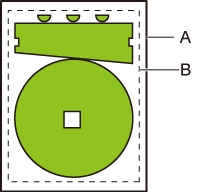
- Printed page size
- Image drawing range
When you print an image above, using Oversize allows you to select where to apply margins (outside/inside the image) based on the image drawing range.
Select ON to apply margins outside the image, or select OFF to apply those inside.
-
When OFF is selected:
Printing is performed based on the image drawing range. The origin is specified on the upper left of the paper.
Margins are added to the inside of the image drawing range.
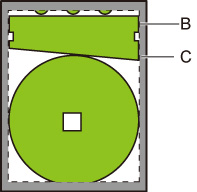
B. Image drawing range
C. Margins
If the actual drawing image is smaller than the specified image drawing range, the image is not cut off by the margins.
-
When ON is selected:
Printing is performed based on the image drawing range. The origin is specified on the upper left of the paper.
Margins are added to the outside of the image drawing range.
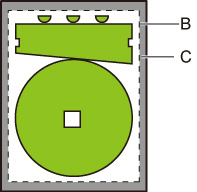
B. Image drawing range
C. Margins
When you specify the paper size for printing, select the size which covers both the image drawing range and margins.
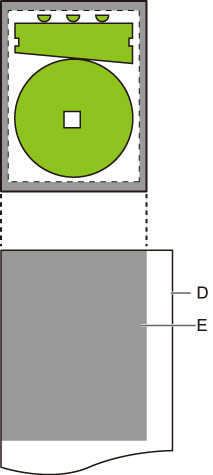
D. Paper for printing
E. Image drawing range with margins
If you select the paper size which cannot cover the margins, the image may be cut off.
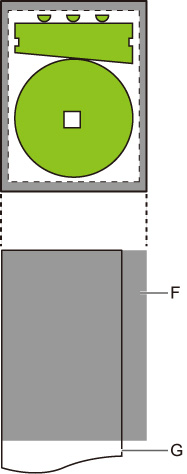
F. Range which cannot be printed
G. Paper for printing
