Checking Ink Level
You can check the ink level in the ink tanks in the Overview screen or the Ink Information screen.
-
In the Overview screen, select the ink display area.
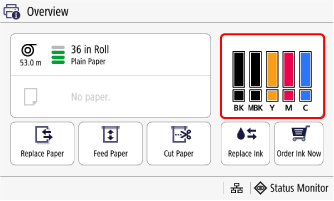
The Ink Information screen appears.
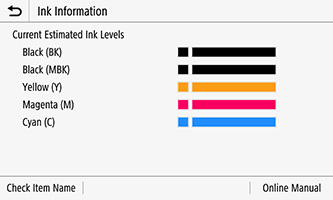
This printer has ink tanks (A) and sub-ink tanks (B). Even if ink runs out, printing can continue with ink in the sub-ink tanks.
When the remaining ink is low,
 will appear on the remaining ink level. When ink runs out,
  will appear.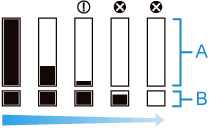
If the touch screen indicates to replace the ink tank, replace the ink tank. If a message is displayed indicating to check the remaining ink levels, or after tasks that consume a lot of ink such as large-format printing or head cleaning, check the remaining levels and replace ink tank as needed.
 Note
Note- If information on where to purchase ink is registered, you can check where to purchase ink with Order Ink Now in the Overview screen.
-
When the ink tank is replaced, the sub-ink tank will be filled with ink.
