Easy Connection
-
Select Easy Connection.
-
Check the message content, and select Yes.
-
After the printer restarts and "Connecting using Easy Connection..." is displayed, return to the application software and continue making settings.
Windows
Click
 (or
(or  ) on the
 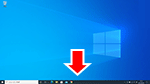 taskbar at the bottom of the screen, follow the on-screen instructions to proceed with setup.
macOS
Click
 on the
 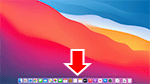 Dock at the bottom of the screen, and follow the on-screen instructions to proceed with setup.
 Note
Note-
After wireless LAN (Wi-Fi) connecting completes, the printer restarts automatically.
-
