Registering Recipients' E-Mail Address
Before you can use the printer's address book, you need to register the recipients' e-mail address. Follow the procedure below to register the recipients' e-mail address.
-
Select
 Others on the HOME screen.
 -
Select
 Scan.
Scan. -
Select
 Attach to E-mail.
 -
Select
 E-mail directly from device.
 -
Select Edit e-mail address book.
-
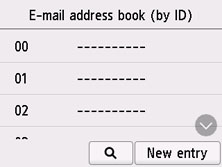
Select Display e-mail address book.
The screen to select an ID number is displayed.
 Note
Note- If you already registered the recipients, the recipients' name is displayed next to the ID number. If you already registered the group mail,
 and the group name are displayed next to the ID number.
- If you already registered the recipients, the recipients' name is displayed next to the ID number. If you already registered the group mail,
-
Select unregistered ID number.
Note- If you already registered the recipients and they are displayed by name, select Switch view. The registered recipients are displayed by ID number.
- If you select New entry, an unregistered ID number will be selected in numerical order.
-
Select Register e-mail address.
-
Select registration method.
-
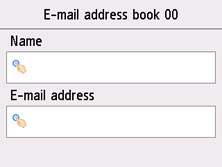
Direct entry
The screen to register the recipient's e-mail address and name is displayed. Go to next step.
-
Select from send log
When you select this registration method, the screen to select the e-mail address from the send logs is displayed.
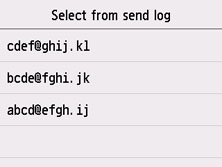
Selecting an e-mail address from the send logs, the screen to register the recipient's e-mail address and name is displayed. Go to next step.
-
-
Enter recipient's name and e-mail address.
-
Select Register to finalize registration.
Note-
To register another recipient's number and name, select an unregistered ID number and operate in the same procedure.
-
