Printing Network Settings
Use the operation panel to print the printer's current network settings.
 Important
- The network settings printout contains important information about your network. Handle it with care.
- Items to Prepare
- At least 10 sheets of unused A4 size plain paper
-
Load paper.
-
On the HOME screen, select the Network icon.
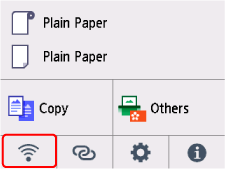
The icon displayed on the button varies depending on the current LAN status.
-
Select Print details.
-
Select Yes on displayed screen.
-
Select ON or OFF on displayed screen.
The printer starts printing network settings information.
