Print Area
A margin required by the printer is added with respect to the size of paper loaded in the printer. The actual printing area corresponds to the paper size minus the space for this margin.
 Note
Note
-
This product supports the minimal margin printing. Depending on the application you use to print, this may be displayed as borderless printing.
-
Printable Area: The area that can be printed.
-
When performing the minimal margin printing on roll paper, the top and bottom margins will be 0 mm (0.00 in.), with a slight margin remaining on the left and right.
-
Recommended Print Area: We recommend printing within this area.
-
To match the document size with the actual printing area, print on oversize paper with the required margin added.
- Printing to Oversized Paper Sizes (Windows)
- Printing to Oversized Paper Sizes (macOS)
Sheets, Postcards
Printable Area
| Size | Printable area |
|---|---|
| Hagaki / Hagaki 2 |
|
| Paper size other than the above |
|
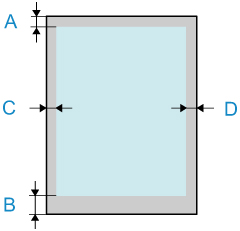
- A: Top Edge
- B: Bottom Edge
- C: Left Edge
- D: Right Edge
Rolls
Printable Area
The required margins are 0.20 in. (5 mm)*1 / 1.18 in. (30 mm)*1 on the top and bottom, and 0.20 in. (5 mm) on the left and right. When performing the minimal margin printing, the top and bottom margins are 0.00 in. (0 mm), and the left and right margins are 0.02 in. (0.5 mm)*2. For information on paper that can be printed with minimal margins, see "Paper Information List".
*1 The margins on the roll paper vary depending on the print settings.
*2 Margins may vary about between 0.1 mm and 0.8 mm depending on settings and your environment.
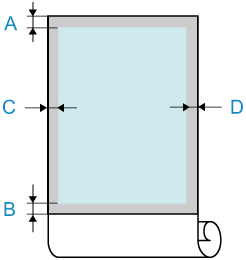
- A: Top Edge
- B: Bottom Edge
- C: Left Edge
- D: Right Edge
Envelopes
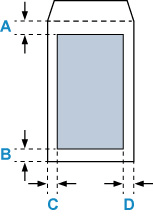
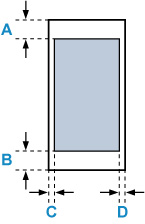
 Printable area
| Size | Printable Area |
|---|---|
| Nagagata 3 / Nagagata 4 |
|
| Yougata 4 / Yougata 6 |
|
| Envelope Com 10 / Envelope DL / Envelope C5 / Envelope Monarch |
|
