Basic Operation (Home Screen)
When you start Easy-Layout Editor, the home screen will be displayed.
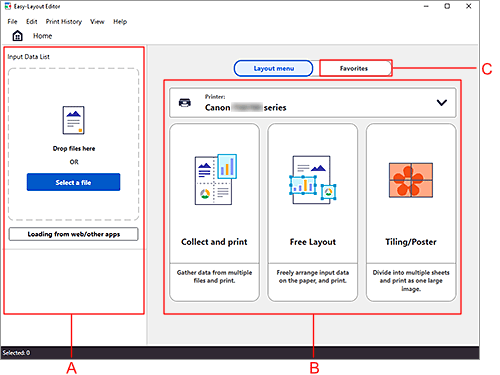
- A: Input Data List
- Input the data you want to print.
- B: Layout menu
- Select the layout menu.
- C: Favorites
- Register your frequently used settings, and select them from the list.
The basic flow of operations is as follows.
-
Input the data you want to print
Drag and drop the data to Input Data List.
Data edited in other application software will also appear in Input Data List. Note
Note-
Supported data types are image data (JPEG/PNG/BMP/TIFF/GIF/PDF), and Office data (Word/Excel/PowerPoint).
Only PDF files that are V1.7 or equivalent can be printed.
For more information on limitations when printing PDF files, see the link below.
-
-
Select the layout menu
-
Follow the instructions on the screen and print
You can also select frequently used settings from Favorites and print.
