
Cloud storage settings Dialog Box
This dialog box allows you to add/delete cloud storage to use. You can also select the cloud storage displayed in the Cloud storage selection dialog box.
The dialog box will be displayed after clicking the Cloud storage settings button of the Preferences dialog box.
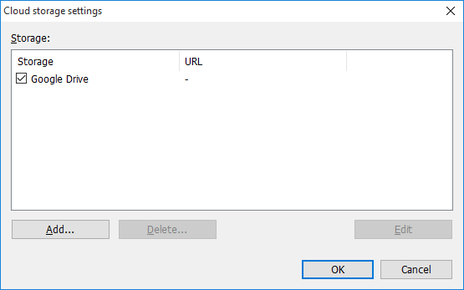
- Storage
-
The registered cloud storage is displayed.
-
Cloud storage where the check box is selected is displayed in the Cloud storage selection dialog box. For details on the Cloud storage selection dialog box, see "Cloud storage selection Dialog Box".
- Add button
-
Open the Cloud storage information dialog box and enter the cloud storage to add. For details on the Cloud storage information dialog box, see "Cloud storage information Dialog Box".
- Delete button
-
Delete the selected cloud storage.
 Note
Note-
You cannot delete Google Drive.
-
- Edit button
-
The Cloud storage information dialog box opens and information about the selected cloud storage is displayed. For details on the Cloud storage information dialog box, see "Cloud storage information Dialog Box".
