
Cloud storage information Dialog Box
This dialog box allows you to configure WebDAV cloud storage settings.
The dialog box will be displayed after clicking the Add or Edit button of the Cloud storage settings dialog box.
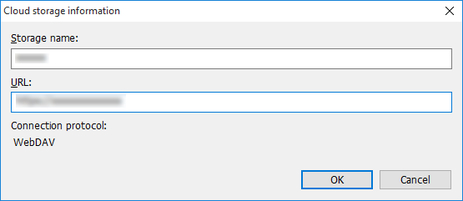
- Storage name
-
Enter the storage name.
-
If you click the Edit button in the Cloud storage settings dialog box, the storage name of the selected cloud storage is displayed.
- URL
-
Enter the URL for the WebDAV connection.
-
If you click the Edit button in the Cloud storage settings dialog box, the URL of the selected cloud storage is displayed.
 Important
-
Access to cloud storage is only guaranteed for "Google Drive".
-
Check with your cloud storage service provider for details on the cloud storage.
-
- Connection protocol
-
WebDAV is displayed.
