
Share settings Dialog Box
Set share users with whom to share files to be uploaded.
For details on how to set share users, see "Share Files with Other Users (Google Drive Only)".
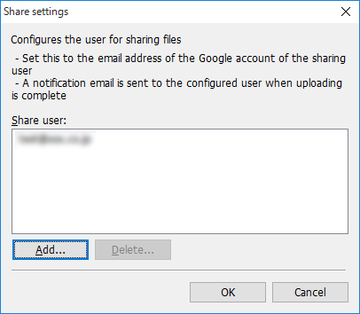
- Share user list
-
The added user's Google account e-mail address will be displayed.
-
After completing file upload, you can share the files with users displayed here.
- Add button
-
Click this button when adding users to the Share user list.
-
The Add user dialog box is displayed.
- Delete button
-
Select the user you want to delete from the Share user list and click this button.
-
The selected user will be deleted from the Share user list.
- OK button
-
Uploads will begin after closing the Share settings dialog box.
