
Preferences Dialog Box
Add and delete the cloud storage to use and make settings related to file download from cloud storage.
The dialog box will be displayed after clicking the  button of the Cloud service integration dialog box.
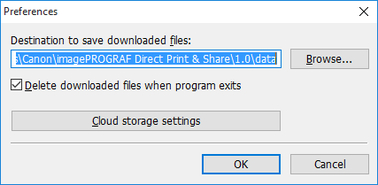
- Destination to save downloaded files
-
Set the destination of where to save files that were downloaded from cloud storage. Click the Browse button and specify your desired save destination.
- Delete downloaded files when program exits
-
By turning on the check box, files that were downloaded from cloud storage will be deleted from your Registered file list and folders when Direct Print & Share exits.
 Note
Note-
Deleted files are the files that were downloaded after starting Direct Print & Share. Files that were downloaded before starting Direct Print & Share will not be deleted.
-
- Cloud storage settings button
-
The Cloud storage settings dialog box is displayed. For details on the Cloud storage settings dialog box, see "Cloud storage settings Dialog Box"
