
Cloud login Dialog Box
This dialog box allows you to log into the cloud service. You first have to create an account for the cloud service.
The dialog box will be displayed after clicking the OK button of the Cloud storage selection dialog box.
For details on how to log into the cloud service, see "Log into the Cloud Service".
If Cloud storage is Google Drive
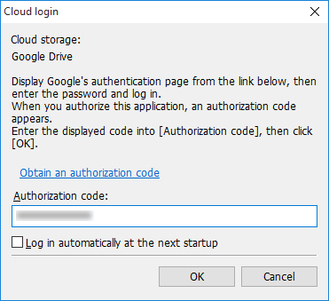
- Cloud storage
-
Cloud storage that can be used is displayed.
- Obtain an authorization code
-
The web browser starts and the Google account login screen is displayed.
- Authorization code
-
Enter the code you obtained from Google.
- Log in automatically at the next startup
-
The next time you log in, you can log in without obtaining a code from Google.
- Log in with a different account
-
You are taken to a dialog box for obtaining the authorization code.
If Cloud storage is not Google Drive
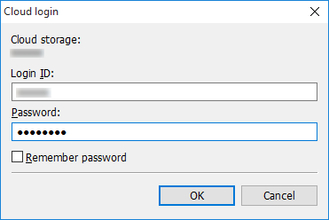
- Cloud storage
-
Cloud storage that can be used is displayed.
- Login ID
-
Enter your account login ID for the cloud service.
- Password
-
Enter your account password for the cloud service.
- Remember password
-
The login ID and password you entered will be remembered. The next time you log in, the login ID and password will be displayed automatically.
