
Exporting Cost Information to a File
Export cost information from acquired job data to a file.
There are two ways to export cost information, as shown below.
-
Export Cost Information of Selected Jobs
-
Export Cost Information at Scheduled Intervals
Export Cost Information of Selected Jobs
Export cost information to a file in CSV format for jobs selected in the Job Cost list.
-
Select the job log to be exported.
Select the job log you want to export to a file from the list.
You can select multiple job logs.
-
Click the
 Export Job Cost Data button.
Or select Export Job Cost Data from Job Cost in the File menu.
Specify the file name and export destination, and then click Save.
Export Cost Information at Scheduled Intervals
Cost information can be exported to a file in CSV format at scheduled intervals.
This applies to all printers for which job costs can be checked in Accounting Manager.
-
Open the Scheduled Export of Cost Information dialog box.
Select Scheduled Export of Cost Information from Job Cost in the File menu.
-
Specify the export criteria.
Specify the Date and Destination, and then click the OK button.
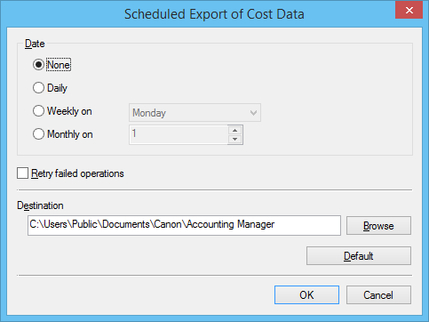
The scheduled export of cost information will be performed using the specified criteria.
 Note
Note-
For details on the scheduled export of cost information, see "Scheduled Export of Cost Information Dialog Box."
-
 Important
-
The scheduled export of cost information requires resident service to be started.
For details on the resident service, see "Resident Service Settings Dialog Box."
