
Scheduled Export of Cost Information Dialog Box
Configure the scheduled export of cost information to a file in CSV format.
This will show all printers for which job costs can be checked in Accounting Manager.
Select Scheduled Export of Cost Information from Job Cost in the File menu to display this dialog box.
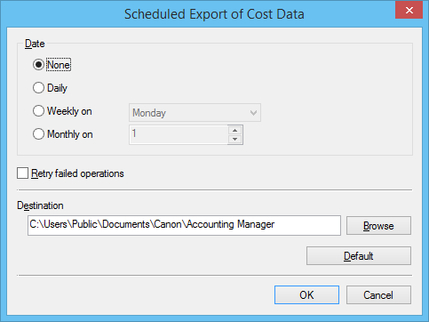
- Date
-
Specify the interval for performing the scheduled export of cost information.
-
Select from None, Daily, Weekly on, and Monthly on.
 Note
Note-
If None is selected, the scheduled export of cost information will not be performed.
-
To create exports at the end of each month, select Monthly on and specify 31 as the date to be performed.
-
- Retry failed operations
-
Check this check box to try creating a schedule again after the export could not be completed for some reason.
- Destination
-
Specify the folder that the cost information is exported to.
-
Files will be exported with a name in the following format: JobCostList_YYYYMMDD-YYYYMMDD.csv. "YYYY" indicates the year, "MM" the month and "DD" the day.
-
If a file with the same name already exists, "(n)" is appended to the end of the file name, so that a file with a duplicate name is not exported.
- Default Button
-
Restores the default value for Destination.
 Important
-
The scheduled export of cost information requires resident service to be started.
For details on the resident service, see "Resident Service Settings Dialog Box."
-
Even if there are no jobs to be included in the exported log, a file will be exported. In this case, only the header row is exported.
