


 Setting Up - Advanced Settings of Receive Mode
Set the mode to Network switch, and then set the number of times to ring the telephone connected to the printer.
 Important
- Contact your local telephone company for detailed information on this service.
-
Press the
 FAX button on the printer.
 -
Press the
 Menu/Wireless connect button.
 -
Use the

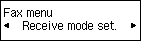
 buttons to select Receive mode set.
 -
Press the OK button.
-
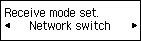
Select Network switch, and then press the OK button.
-
Make sure Yes is selected, and then press the OK button.

-
Press the OK button.

-
Use the Numeric buttons or
buttons to set the number of times to ring the telephone.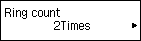
-
Press the OK button.
The advanced settings of the receive mode are completed. Go to the next page.
