
Printing from Smartphone or Tablet
Use "Canon PRINT" to easily print or scan from a smartphone or tablet (hereinafter "smartphone").
Downloading Application
Download the app available free on the App Store or Google Play.
Search for "Canon PRINT" in App Store or Google Play, or access the website from the QR Codes below.
-
iOS Users

-
Android Users

Application Setup
Once you have installed the application, follow the steps below to register the printer.
 Important
-
If
 (Wi-Fi icon) is not displayed at the top of your smartphone screen, connect the smartphone to a wireless router.
-
Start application and tap
 (Register Printer) at upper left of screen.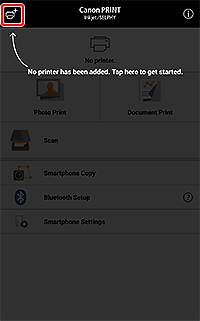
Printer detection starts.
-
Tap printer name that appears.
-
Check if your printer appears at the top of the screen.
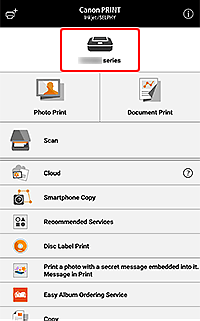
When the registered printer appears at the top of the screen, setup is complete.
Printing Photos with Application
Once you have set up the application, follow the steps below to print.
-
See "Getting Started" and load photo paper in printer.
-
Tap Select Images.
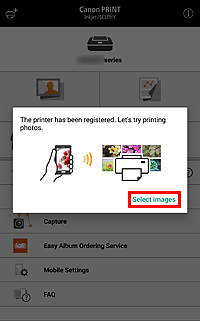
 Note
Note- If an application message requesting access to photos appears, tap OK, and then proceed to the next step.
- Select Images appears only when registering a printer. Tap Photo Print from the next time.
-
Select image you want to print, and then tap Next.
-
Specify print settings, and then tap Print.
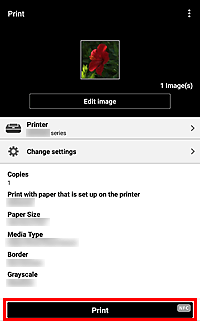
Printing starts with the specified settings.
Return to the setup screen displayed on the computer, click Next, and then proceed with the setup.
General Notes
- Screens displayed may vary depending on your smartphone.
- To download the application, you must register for an account with App Store or Google Play.
- The application can be downloaded for free; however, transmission fees for connecting to App Store or Google Play apply.
- Download is not possible if your operating system environment does not support the application. The application download page may not appear.
