


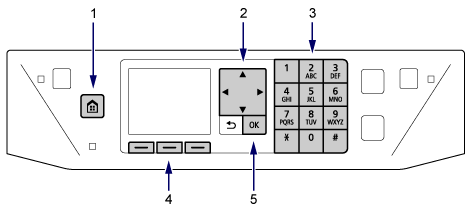
- (1)
 HOME button
 - Press to display the HOME screen.
- (2)
 ,
,  ,
,  , and
, and  buttons
 - Use to select menu items or setting items. Use to enter characters as well.
- (3) Numeric buttons
- Use to enter fax/telephone numbers and characters.
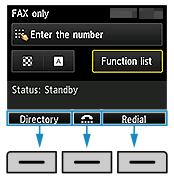
- (4) Function buttons
-
Use to select a function menu displayed at the bottom of the LCD.
- (5) OK button
- Use to finalize the selection of a menu item or setting item.
