


Set the number of times to ring the telephone connected to the printer at reception of a fax.
-
Press the
 button on the printer.
 -
Press the
 button.
 -
Use the

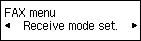
 buttons to select Receive mode set.
 -
Press the OK button.
-
Make sure that Fax only mode is selected, then press the OK button.

-
Make sure that Yes is selected, then press the OK button.

-
Press the OK button.

-
Use the Numeric buttons or the
buttons to set the number of times to ring the telephone.
-
Press the OK button.


