


On this printer, you can enter characters using the Numeric buttons (A).
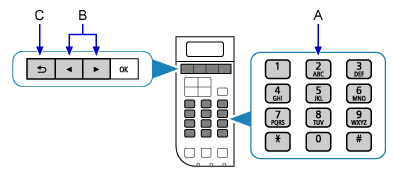
Multiple characters are assigned to each key. Press a key repeatedly to enter a character.
For details on assigned characters, refer to "Key Assignments" below.
<Key Assignments>
| Button | Lower case mode "abc" |
Upper case mode "ABC" |
Numeric mode "123" |
|---|---|---|---|
| 1 | 1 | ||
| 2 | abcåäáàãâæç | ABCÅÄÁÀÃÂÆÇ | 2 |
| 3 | defëéèê | DEFËÉÈÊ | 3 |
| 4 | ghiïíìî | GHIÏÍÌÎ | 4 |
| 5 | jkl | JKL | 5 |
| 6 | mnoñøöóòõô | MNOÑØÖÓÒÕÔ | 6 |
| 7 | pqrsÞ | PQRSþ | 7 |
| 8 | tuvüúùû | TUVÜÚÙÛ | 8 |
| 9 | wxyzý | WXYZÝ | 9 |
| 0 | 0 | ||
| # | . @ - _ SP * # ! " , ; : ^ ` = / | ' ? $ % & + ( ) [ ] { } < > | ||
| * | Each time you press this button, the entry mode changes between lower case mode "abc", upper case mode "ABC" and numeric mode "123". | ||
SP: Indicates a single space.
- To enter characters assigned to the same key successively (e.g., enter "N" then "O"), press the
 button (B) to move the cursor by one character to the right first.
 - To insert a space, move the cursor to the target position using the
 or button (B), then press the
  button five times.
 - To insert characters, move the cursor to the character on the right of the target position using the or button (B), then enter characters.
- To delete a character, move the cursor to the target character using the or button (B), then press the
 button (C).
