Cableless setup Connection
-
Select Cableless setup.
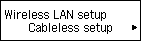
-
Press the OK button.
-
When the printer preparation is complete, the screen below appears.
Return to the application screen and proceed with the setup.

Select Cableless setup.
Press the OK button.
When the printer preparation is complete, the screen below appears.
Return to the application screen and proceed with the setup.
© Canon Inc. 2016

