
 Text Entry
You can enter text when a keyboard is shown on the printer. Follow the procedure below.
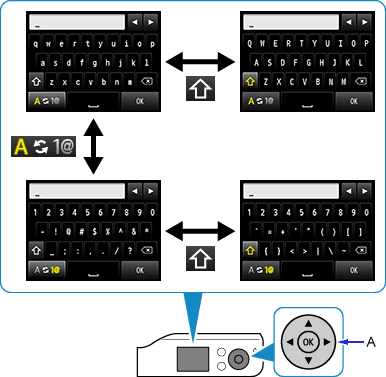
-
You can enter text when the keyboard is displayed on the printer screen.
Text entry is case-sensitive.

- Switches between "lower case letters" and "numbers and symbols."

- Switches between upper and lower case letters while letters of the alphabet appear. Switches symbol types while numbers and symbols appear.

- Inserts a space.

- Deletes the character at the cursor. Use
 or
or  to move the cursor to the target character.
Use the


 buttons (A) to select a character on the keyboard, and then press the OK button to enter it.
Repeat 1 and 2 until text entry is complete.
 Additional Information
- To insert characters, move the cursor to the character on the right of the target position using or , then enter characters.
