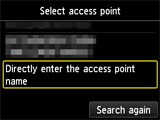
การเชื่อมต่อผ่านตั้งค่าขั้นสูง

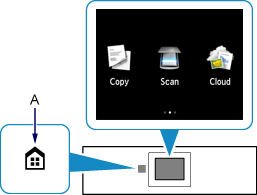
  1. สัมผัสปุ่ม หน้าแรก(HOME) (A)

    หน้าจอ HOME
  2. เลื่อนหน้าจอด้านซ้ายหรือด้านขวา จากนั้นแตะไอคอน WLAN
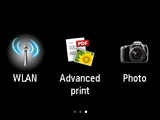
    หน้าจอ HOME: เลือก WLAN
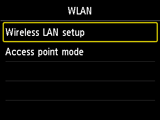
  3. แตะ Wireless LAN setup

    หน้าจอ WLAN: เลือก Wireless LAN setup
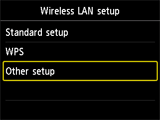
  4. แตะ Other setup

    หน้าจอ Wireless LAN setup: เลือก Other setup
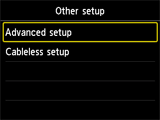
  5. แตะ Advanced setup

    หน้าจอ Other setup: เลือก Advanced setup
  6. แตะ Directly enter the access point name
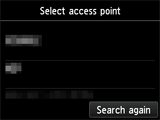
    หน้าจอการเลือกจุดเข้าใช้งาน
    ลูกศร
    หน้าจอการเลือกจุดเข้าใช้งาน: เลือก Directly enter the access point name