Easy WL connect
-
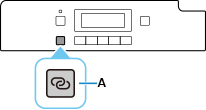
Press and hold the Wireless connect button (A) for about three seconds.
-
When the printer preparation is complete, the screen below appears.

-
Return to the application software and proceed with the setup.
macOS
Click
 in the Dock, follow the on-screen instructions to proceed with setup.