WPS (PIN Code) Connection
-
Select Other setup and press the OK button.

-
Select WPS (PIN code) and press the OK button.

-
Follow the on-screen instructions on a computer to set a PIN code on the wireless router.

-
When the screen on the below appears, press the OK button.

If a different screen appears, see "Troubleshooting."
-
Press the Setup button.
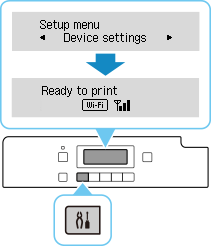
The network connection setup is now complete.
When connection is complete,
 appears on screen.
 -
Return to the application software and proceed with the installation.
macOS
Click
 in the Dock, follow the on-screen instructions to proceed with setup.