What to Do When Small Paper Sizes Are Jammed
Cause
Small paper is jammed.
What to Do
If the paper jams when you try to print on a small paper size such as 4"x6" 10x15cm size, follow the steps below.
 Important
- The printer cannot be turned off while it is sending or receiving a fax, or when the received fax or the unsent fax is stored in the printer's memory. Make sure that all faxes have been sent and received, press the printer's Stop button to stop printing, and then turn off the printer.
-
Press printer's Stop button.
-
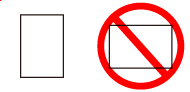
Load one sheet of A4 or Letter size paper in portrait orientation in cassette.
Align the paper guide of the cassette with the edge of the paper.
Do not load the paper in the landscape orientation.
-
Turn off printer.
-
Turn on printer.
When the loaded paper is fed, the jammed paper will be pushed out.
 Note
NoteIf the jammed paper is not ejected, try cleaning the paper feed rollers before step 5. The jammed paper may be ejected along with the paper used for cleaning the paper feed rollers.
-
Load paper in cassette.
ImportantDo not load paper in landscape orientation. It may cause a paper jam.
You cannot print on paper smaller than the minimum size.
Note- Make sure you are using suitable paper and loading it correctly.
-
Redo printing.
All jobs in the print queue are canceled. Redo the printing.
