Print without Changing Paper and Print Settings (2110)
Cause
An incompatible print setting combination has been specified for the paper loaded in the cassette.
What to Do
For example, to continue printing/copying with a mismatch between the paper loaded in the cassette and the paper information registered in the printer, follow the steps below.
 Important
The printed result may not be the intended color or size.
-
Press printer's OK button.
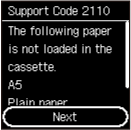
-
Select Print on set paper with printer's

 buttons and press OK button.
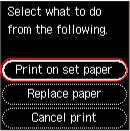 Important
- Depending on your printer's settings, Print on set paper may not be displayed.
