2110
Cause
An incompatible print setting combination has been specified for the paper loaded in the cassette.
What to Do
To specify the appropriate print settings for the paper loaded in the cassette and retry printing, follow the steps below.
 Note
Note
- For other ways to deal with this problem, see the following pages.
- To disable notifications for this error, disable the function to detect paper setting mismatch.
-
Press printer's OK button.
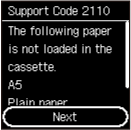
-
Select Cancel print with printer's

 buttons and press OK button.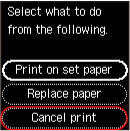
-
Reload paper in cassette.
-
Check paper information (paper size and media type).
The paper information is used in the print settings that you specify when you redo the printing in step 5.
After checking the paper information (paper size and media type), select OK with the printer's
buttons and press the OK button.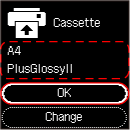
-
Redo printing.
NoteFor the proper combination of paper size and media type, see below.
