1687
Cause
The appropriate FINE cartridge is not installed, or other FINE cartridge is installed,
What to Do
Check that the FINE cartridge is compatible with your printer.
Open the scanning unit / cover to open the ink cartridge locking cover, and then remove the FINE cartridges.
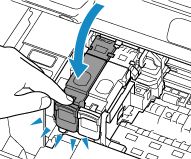
Make sure that the FINE cartridges are compatible with this printer and reinstall them.
Press down the ink cartridge locking cover until it clicks into place.