What to Do When Paper Is Jammed
Cause
Paper is jammed.
What to Do
If a paper jam occurs during printing (support code 1300/1303/1304/1313 is displayed), follow the procedure below.
 Note
Note
- If the paper is not jammed (no support code displayed) but the paper is not fed or output normally, see What to Do If Paper Is Not Fed/Output Normally.
-
Did you try to print on a small paper size such as 4"x6" 10x15cm size?
-
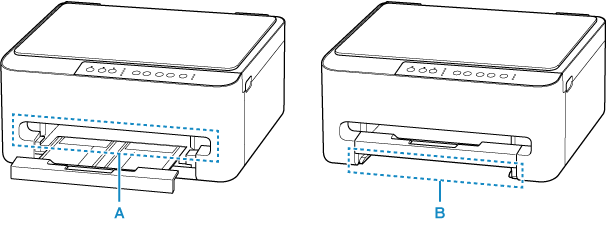
Check if the jammed paper is visible in the paper output slot (A).
If the jammed paper is visible, remove the jammed paper by referring to the following pages.
-
Retract the paper output tray,
-
Remove the cassette, and then check if the jammed paper is visible in the feed slot (B) of the cassette.
If the jammed paper is visible, remove the jammed paper by referring to the following pages.
-
If the jammed paper is not visible in the paper output slot or the feed slot, remove the jammed paper inside printer.
