Device Settings Tab Description
Many of the tabs in the Properties windows of the printer are controlled by Windows. However, the Device Settings tab is for specifying printer configuration-related settings and is part of the printer driver.
The Device Settings tab allows you to specify settings related to the printer unit, as well as administrator settings.
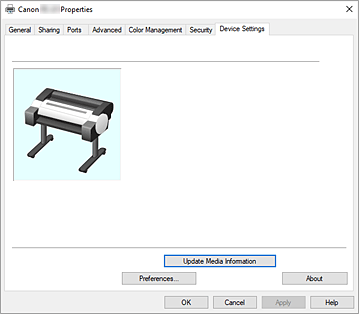
- Update Media Information
-
Opens the Update Media Information dialog box.
Gets the latest media information from the printer and updates the media information in the printer driver. - Preferences...
- Configure administrator settings for the printer driver.
- About
-
Opens the About dialog box.
You can check information such as the version and copyright of the printer driver.- Settings for Data Sending
-
If you click Settings for Data Sending, the Settings for Data Sending dialog box will be displayed.
If it includes data you do not agree to sending, uncheck this check box.
Preferences dialog box
- Use System Language
- Set this to On to change the display language of the printer driver according to the OS language settings.
