Setting Paper Dimensions (Custom Size)
You can specify the height and width of paper when its size cannot be selected from the Page Size. Such a paper size is called "custom size."
If you will be using a user-defined paper repeatedly, setting it from Size Options... is convenient because it becomes registered to Page Size and can be selected any time after that.
The procedure for specifying a custom size is as follows:
Open the printer driver setup window
Click Size Options... on the Page Setup tab
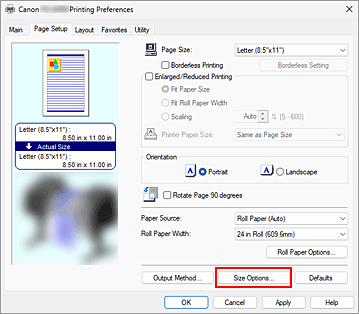
The Paper Size Options dialog box opens.
Register user-defined paper
Set Custom Paper Size Name, Units, and Paper Size, and then click Add.
For Paper Size, specify a size or select the paper size to be used from Paper Size List.
To narrow down the paper sizes displayed in Paper Size List, select the Display Series check box.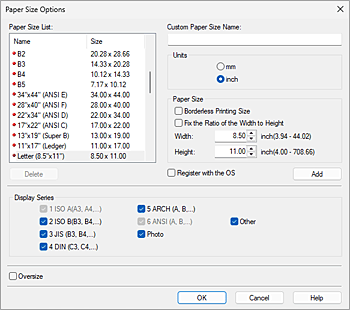
 Note
Note- By selecting the Borderless Printing Size check box for Paper Size, you can select a size from the paper sizes that support Borderless Printing. By selecting the Fix the Ratio of the Width to Height check box, you can change the size while keeping the Width and Height ratio.
Set user-defined paper
Click OK, then it returns to Page Setup tab.
The paper size registered by using Custom Paper Size Name is registered to Custom Paper Size of Page Size and can be selected at any time.
 Important
- If the application software that created the document has a function for specifying height and width values, use the application software to set the values. If the application software does not have such a function or if the document does not print correctly, perform the above procedure from the printer driver to set the values.
- Printing may be disabled depending on the size of the specified user-defined media.
For information about printable sizes for user-defined media, see "Paper Sizes."
Note
- If the paper settings in the printer driver differ from the paper information registered on the printer, an error message may appear on the printer's operation panel. You can still print but you may not be able to obtain correct print results.
