Printing a Color Document in Monochrome

|

|

|
The procedure for printing a color document in monochrome is as follows:
Select Quality & Media from Printer Options in the Print Dialog
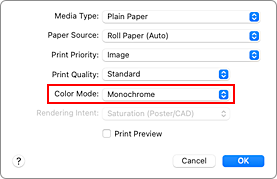
Set monochrome printing
Select Monochrome or Monochrome Bitmap in Color Mode.
 Note
Note- The available Color Mode options vary depending on the paper type selected under Media Type.
- Monochrome Bitmap can be set only if Line Drawing/Text is selected under Print Priority.
Complete the setup
Click Print.
When you execute print, the document is converted to grayscale data. It allows you to print the color document in monochrome.
Note
- With monochrome printing, inks other than black ink may be used as well.
