
Canon IJ Printer Utility2
The Canon IJ Printer Utility2 allows you to perform printer maintenance or change the settings of the printer.
 Note
Note
- If you are using macOS 15 or later, you must configure each application to allow device discovery on the local network. Failing to enable device discovery may restrict software functionality or prevent it from starting properly.
For detailed instructions, refer to "Setting Up Local Network Device Discovery."
The list of applications displayed under Local Network may include all or some of the following, depending on usage.- Canon IJ Printer Setup2
- Canon IJ Printer Utility2
- If the printer driver's functions do not work correctly even after enabling device discovery, delete the printer driver while keeping device discovery enabled, then add the printer driver again.
What You Can Do with the Canon IJ Printer Utility2
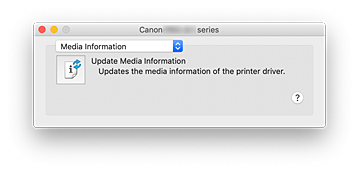
You can switch between pages in Canon IJ Printer Utility2 by the pop-up menu. You can choose one of the following items from the pop-up menu.
- Custom Settings
- Change the settings of this printer.
- Online Printing Resources
-
Go to a Canon website with printing resources such as ICC profiles and printing tips.
 Important
- To use this function, you must have an Internet connection. Note that you are responsible for any Internet connection fees.
- Media Information
- Gets the latest media information from the printer and updates the media information in the printer driver.
Note
- To operate the Canon IJ Printer Utility2, you must first turn on the printer.
- Depending on the items selected, the computer communicates with the printer to obtain information. If the computer is unable to communicate with the printer, an error message may be displayed.
If this happens, click Cancel to display the most recent settings specified on your computer.

