Changing the Base Printer
Change the printer for which you want to change the media information.
 Note
Note
-
In Media Configuration Tool, the printer at startup or selected with
 (Find Printer) is called the base printer.
 -
If you are using macOS 15 or later, you must configure each application to allow device discovery on the local network. Failing to enable device discovery may restrict software functionality or prevent it from starting properly.
For detailed instructions, refer to "Setting Up Local Network Device Discovery."
The list of applications displayed under Local Network may include all or some of the following, depending on usage.- Media Configuration Tool
-
Click
(Find Printer) (or select Find Printer from the File menu).
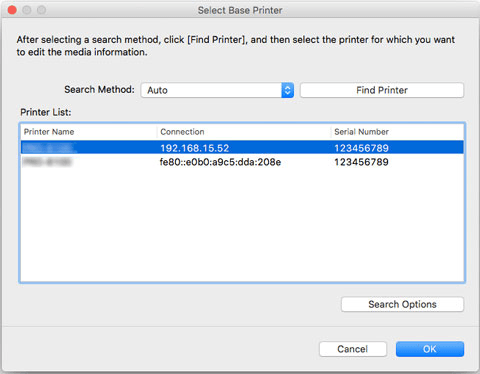
A search for printers is performed, and the Select Base Printer dialog box appears.
Note-
It may take time before the Select Base Printer dialog box appears.
-
-
Select the printer for which you want to change the media information, and then click the OK button.
 Note
Note-
If the printer that you wish to update the media information does not appear, select Auto in Search Method, and then click the Find Printer button or select IPv4/IPv6, and then click the Find Printer button, and enter the printer IP address directly.
-
To search by SNMP community, click Search Options, and then specify a Specify community name.
The media information for the selected printer appears in the main screen.
Note-
It may take time before the media information appears in the main screen.
-
