
You can set automatic duplex printing as a default.
Follow the procedure below to perform setting.
Make sure that the machine is turned on.
Press the MENU button.
The menu screen is displayed.
Select  ECO settings then press the OK button.
Use the 
 button to change the setting item, use the
 button to change the setting, then use the OK button to confirm the selection.
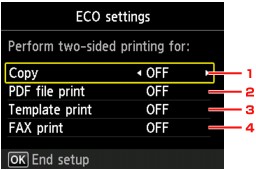
Copy
Sets two-sided copying as a default.
PDF file print
Sets two-sided printing of PDF files saved on a USB flash drive as a default.
Template print
Sets two-sided printing of template forms on the machine as a default.
FAX print
Sets two-sided printing of sent/received faxes, reports, or lists as a default.
 Important
Under the conditions below, faxes are printed in single-sided even when ON is selected.
when color faxes are received
when Legal is selected for Page size on FAX paper settings.
 Note
NoteWhen two-sided printing is selected, the  icon is displayed on the menu screen or on each print setting screen.
Page top |


